How to Show Customers Their Cart ID on Shopify

When a shopper writes to you about their cart, for example a discount that does not apply or a checkout error, you cannot see that cart in Shopify. So you ask what is in it, which size, which code, and the shopper waits for every answer.
A Cart ID fixes that. Your cart page shows the shopper a short ID they can copy and send you. You search it in Cartlytics and see their exact cart: the products, the value and every step they took. You answer in one message instead of five. Turning it on takes two minutes and no code.
How to turn it on
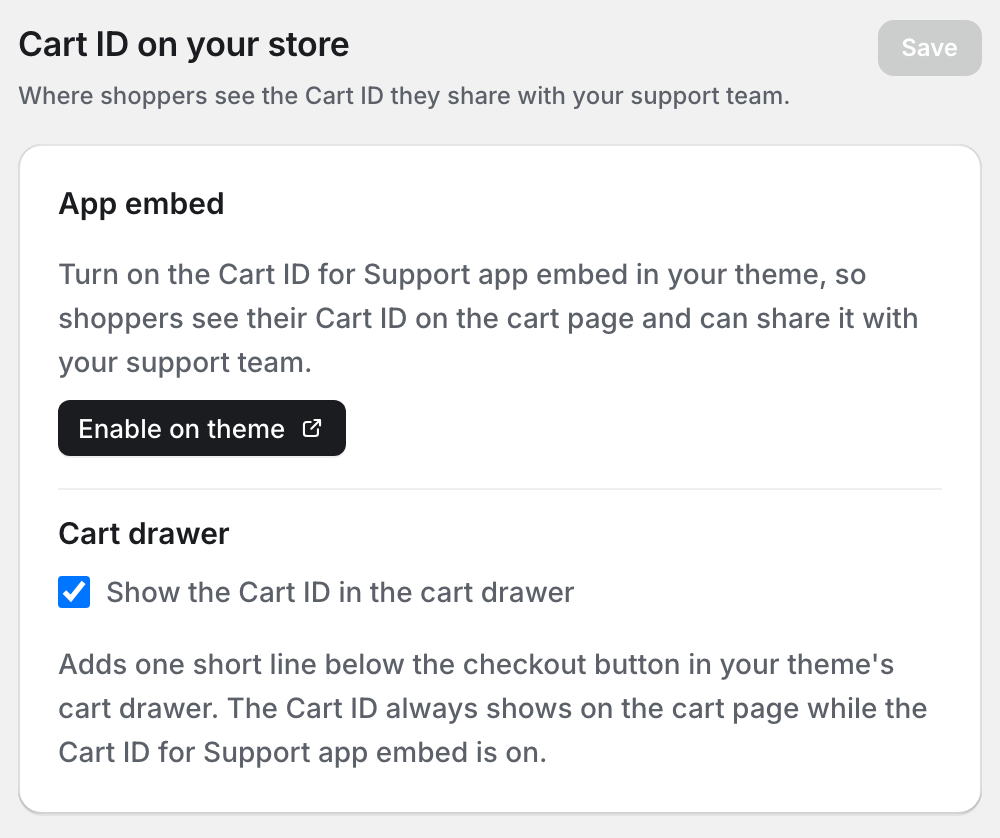
- In Cartlytics, go to Settings and open the "Cart ID" tab.
- Click "Enable on theme". Your Shopify theme editor opens in a new tab.
- Turn on "Cart ID for Support" and click "Save". Your cart page now shows a small card with the Cart ID and a Copy button.
If something does not work
If the button does not open the theme editor, do it from your Shopify admin. Go to Online Store and click "Edit theme" on your current theme. In the left sidebar, open "App embeds", turn on "Cart ID for Support" and click "Save".
The card shows only on the cart page, and only when the cart has items. Add a product first, then open your cart page.
If your store uses a cart drawer instead of a cart page, in Cartlytics go to Settings, open the "Cart ID" tab and turn on "Show the Cart ID in the cart drawer". The ID then also shows below the checkout button in the drawer.
The app embed is turned on for one theme at a time. If you publish a new theme, turn on Cart ID for Support again in that theme.
How your support team uses it
Ask for the Cart ID in your first reply. The shopper copies it from the cart page or reads it out on the phone. Your team pastes it into the search on the Carts page ("Search by customer, phone or cart ID") and the exact cart opens. From there you can see what went wrong and turn the cart into a Shopify draft order the shopper can pay.
Common questions
Do I need to edit my theme code?
No. Cart ID for Support is an app embed, so you turn it on and off in the theme editor. There is no code to copy, and turning it off removes it from your store.
Is it safe to show the Cart ID to shoppers?
Yes. The ID only helps your team find the cart in Cartlytics. Nobody can use it to open, change or buy the cart.
Can I change the text on the card?
Yes. In the theme editor, open "App embeds" and click "Cart ID for Support" to change its title and its text. Write them in the language of your store.
Where else can I find these steps?
In the Cartlytics app, open the FAQ. The question about the Cart ID has the same steps and an "Enable on theme" button.
Find the cart behind every question
Install Cartlytics for free and turn on the Cart ID widget, so your team sees the exact cart each shopper asks about.
Install Cartlytics for free